
Enigma Signal Meter-Sat Finder1.1.2 - Google Play
You'll be able to see results in few seconds.
Publisher Description
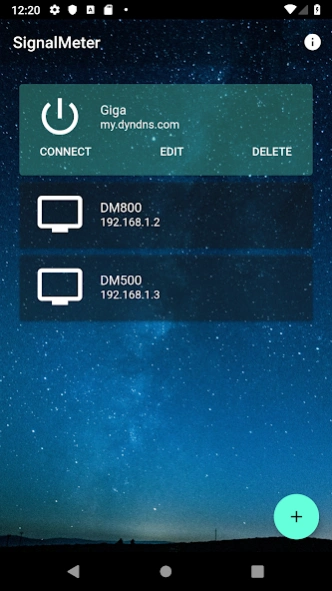


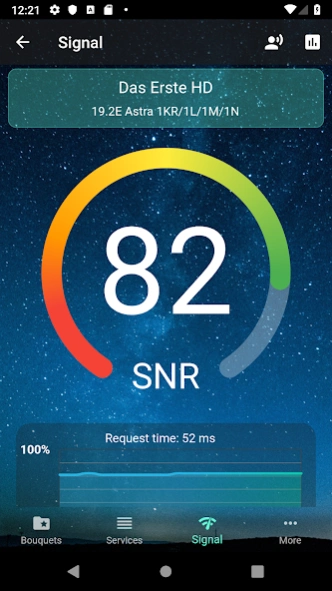
Align your satellite dish to perfection, ZAP, take screenshots and watch streams
Use your phone or tablet to align your satellite dish by reading signal levels from Enigma 1 or Enigma2 satellite receiver.
YOU WILL NEED SATELLITE RECEIVER WITH ENIGMA 1 OR ENIGMA 2 SOFTWARE TO USE THIS SOFTWARE.
SUPPORTS ALL currently existing Enigma1 and Enigma2 receivers and images, has same interface for both versions and works remotely (just forward web port and you can connect from anywhere). Additionally it allows you to ZAP channels, take screenshots and watch live TV streams directly on your device. SatFinder for Dreambox, VU+ and many others.
FOR STREAM:
- make sure you have video player with RTSP stream support (VPlayer or Daroon player)
- user internal IP address (192.168...) instead of public IP/hostname to avoid problems with routing and port forwarding. Once you're sure it's working locally and you have UPLOAD speed of more than 5-6 MBit/s try to forward TCP ports 80, 8001 and 31339.
Tested and working on this receivers:
- Dreambox DM500
- Dreambox DM500HD
- Dreambox DM600
- Dreambox DM7000
- Dreambox DM7020
- Dreambox DM7025
- Dreambox DM800
- Dreambox DM800SE
- Dreambox DM8000
- Dreambox 900 UHD
- Dreambox 920 UHD
- Dreambox One
- VU+ Uno
- VU+ Duo
- AzBox Premium
- AzBox HD Elite
- AzBox Ultra HD
- Kathrein UFS 910
- IPBox 9000
- Amiko Alien
- Topfield TF 7700HD PVR
- Gigablue solo
- Gigablue Quad Plus
- ClarkeTech ET9000
- ClarkeTech Xtrend ET5000
- Edision OS Mio
For informations and support visit
http://www.krkadoni.com
About Enigma Signal Meter-Sat Finder
The company that develops Enigma Signal Meter-Sat Finder is Krkadoni. The latest version released by its developer is 1.1.2.
To install Enigma Signal Meter-Sat Finder on your Android device, just click the green Continue To App button above to start the installation process. The app is listed on our website since 2026-06-11 and was downloaded 0 times. We have already checked if the download link is safe, however for your own protection we recommend that you scan the downloaded app with your antivirus. Your antivirus may detect the Enigma Signal Meter-Sat Finder as malware if the download link to com.krkadoni.app.signalmeter is broken.
How to install Enigma Signal Meter-Sat Finder on your Android device:
- Click on the Continue To App button on our website. This will redirect you to Google Play.
- Once the Enigma Signal Meter-Sat Finder is shown in the Google Play listing of your Android device, you can start its download and installation. Tap on the Install button located below the search bar and to the right of the app icon.
- A pop-up window with the permissions required by Enigma Signal Meter-Sat Finder will be shown. Click on Accept to continue the process.
- Enigma Signal Meter-Sat Finder will be downloaded onto your device, displaying a progress. Once the download completes, the installation will start and you'll get a notification after the installation is finished.
Program Details
System requirements
Download information
Pricing
Version History
version 1.1.2
posted on 2026-06-11
- Rebuilt on the latest Flutter for better speed and stability; now targets Android 16- Fixed crashes on startup, in the full-screen chart, and during connect/disconnect- Fixed circular signal indicator not showing- Fixed adding a new profile overwriting the existing one- Fixed tapping a profile opening settings instead of expanding it- Fixed settings screen sometimes not appearing- Polished charts, progress bars and refreshed app icons
version 1.1.2
posted on 2026-06-11
- Rebuilt on the latest Flutter for better speed and stability; now targets Android 16
- Fixed crashes on startup, in the full-screen chart, and during connect/disconnect
- Fixed circular signal indicator not showing
- Fixed adding a new profile overwriting the existing one
- Fixed tapping a profile opening settings instead of expanding it
- Fixed settings screen sometimes not appearing
- Polished charts, progress bars and refreshed app icons
version 1.1.2
posted on 2026-06-11
- Rebuilt on the latest Flutter for better speed and stability; now targets Android 16
- Fixed crashes on startup, in the full-screen chart, and during connect/disconnect
- Fixed circular signal indicator not showing
- Fixed adding a new profile overwriting the existing one
- Fixed tapping a profile opening settings instead of expanding it
- Fixed settings screen sometimes not appearing
- Polished charts, progress bars and refreshed app icons
version 1.0.4
posted on 2020-06-01
- Send messages to the receiver
- French translation (thnx to @pr2 from OpenPli forum)
- Dutch translation (thnx to Voorzitter from OpenPli)
- Spanish translation (thnx to @jpuigs from OpenPli forum)
- Catalan translation (thnx to @jpuigs from OpenPli forum)
- Italian translation
- Chinese translation
- German translation
- Russian translation
version 1.0.2
posted on 2020-01-23
- added support for x86_x64 devices
- channel+ / channel- buttons can now be mapped in settings
*Please note that the way this buttons work depends on Web interface, not plugin itself.
version 1.0.0
posted on 2019-10-04
- support for Dreambox security features
- decimals in dB values
- option to set dB as default value
- channel up/down buttons on signal page
- screenshot export
- fix for screenshot on DreamOS
version 1.0.0
posted on 2019-09-13
New interface, better handling of network errors
version 0.106
posted on 2015-12-27
Major application redesign,- support for x86 devices,- support for tablet devices / landscape mode,- added stream port setting,- support for stream transcoding,- enabled TextToSpeech for signal reading,- additional Screenshot options,- new Send to Sleep and Restart GUI command,- major visual Material redesign
version 0.021
posted on 2013-01-25
Several fixes and updates
Disclaimer
Official Google Play Link
We do not host Enigma Signal Meter-Sat Finder on our servers. We did not scan it for viruses, adware, spyware or other type of malware. This app is hosted by Google and passed their terms and conditions to be listed there. We recommend caution when installing it.
The Google Play link for Enigma Signal Meter-Sat Finder is provided to you by apps112.com without any warranties, representations or guarantees of any kind, so access it at your own risk.
If you have questions regarding this particular app contact the publisher directly. For questions about the functionalities of apps112.com contact us.
